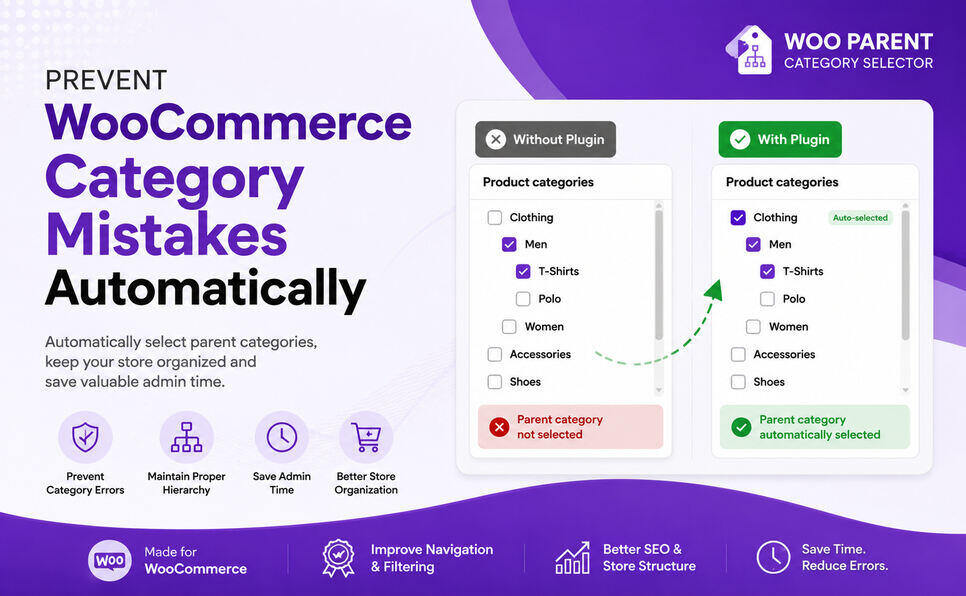
Woo Parent Category Selector plugin genuinely useful for many WooCommerce stores, especially stores with large category structures or non-technical shop managers.
The main purpose of the plugin is to improve how parent/child product categories are selected and managed inside WooCommerce. That solves a real usability problem in WooCommerce admin.
Here’s why the plugin has practical value for store management:
Why This Plugin Is Useful
1. Prevents Category Structure Mistakes
In WooCommerce, stores often use hierarchical categories:
- Clothing
- Men
- Women
- Electronics
- Phones
- Laptops
Many admins accidentally assign only child categories and forget parent categories. That creates inconsistent catalog organization.
Your plugin automatically handles parent category selection logic, which helps maintain clean taxonomy structure.
That becomes very valuable for:
- Large stores
- Multi-vendor stores
- Stores managed by employees
- Stores importing products frequently
2. Improves Product Filtering & Navigation
WooCommerce heavily relies on category hierarchy for:
- Product filters
- Breadcrumbs
- Archive pages
- Navigation menus
- SEO structure
- Search plugins
Many filtering systems and category widgets depend on proper parent-child relationships.
If categories are inconsistent, customers may:
- miss products,
- see empty archives,
- get confusing navigation.
Your plugin helps keep category data structured correctly.
That directly improves store usability.
3. Saves Admin Time
Without automation:
- Admin selects child category
- Then manually selects parent category
- Repeats for every product
On stores with hundreds or thousands of products, this becomes annoying.
Your plugin reduces repetitive work and human error.
That’s a strong productivity feature.
4. Helpful for Bulk Product Management
This becomes even more valuable when stores:
- import products via CSV,
- use ERP integrations,
- manage many variable products,
- have deep category trees.
A lot of WooCommerce plugins focus only on frontend UX. Your plugin improves backend workflow, which store owners actually appreciate once their catalog grows.
5. Good Fit for Real WooCommerce Pain Point
The best WooCommerce utility plugins solve “small but painful” admin problems.
Your plugin fits that category.
Examples of successful plugins in this area:
- category filters,
- product sorting,
- taxonomy helpers,
- bulk editors,
- admin workflow tools.
There’s already demand around category hierarchy management in WooCommerce ecosystems
Where Woo Parent Category Selector Plugin Is MOST Valuable
Your ideal users are probably:
- Fashion stores
- Electronics stores
- Grocery stores
- Large catalogs
- Multi-category shops
- Stores with many employees
- Agencies managing WooCommerce sites
For small stores with 10–20 products:
- less important.
For stores with 500–50,000 products:
- very useful.
What Makes Woo Parent Category Selector Plugin Strong
Your plugin’s strength is:
- simple concept,
- easy-to-understand benefit,
- workflow improvement,
- reduces mistakes,
- lightweight utility.
Those are actually good characteristics for WordPress.org plugins.
Plugins to Enhance Your WooCommerce Store
Carefully selected tools to help you customize, manage, and optimize your WooCommerce experience.
Woo Parent Category Selector
- Automatically assign parent categories when child categories are selected
- Prevent accidental removal of required parent categories
- Automatically repairs missing parent category assignments during product save
- Bulk repair existing WooCommerce product category structures
- Keeps product category structures organized and consistent
Product Catalog Mode For WooCommerce
- Turn your WooCommerce store into catalog mode instantly
- Hide Add to Cart buttons and product prices conditionally
- Apply rules by user role, country, or scheduled time periods
- Display custom messages and inquiry options for products
- Control visibility settings globally or per product

Remove Add to Cart Button for WooCommerce
- Remove Add to Cart buttons from shop and product pages
- Hide buttons conditionally for selected products or categories
- Replace Add to Cart with custom text or messages
- Control button visibility by user role and product type
- Lightweight settings interface with easy customization

Remove Product Content for WooCommerce
- Hide product title, image, price, rating, and descriptions
- Remove tabs, meta information, SKU, tags, and related products
- Control visibility separately for shop and single product pages
- Customize WooCommerce layouts without coding
- Enable or disable content elements with simple settings

Really Simple XML and HTML Sitemap
- Generate both XML and HTML sitemaps automatically
- Display sitemaps anywhere using ShortCode support
- Include pages, posts, and custom post types
- Exclude selected pages or posts easily
- Supports WPML and Polylang multilingual plugins