
First, we need to know what is meta tags and why it is important to add them to pages, posts or categories. In SEO, meta tags play a key role in better ranking on search result pages. It provides concise information to search engine spiders to understand the meaning (context) of your content. It will be shown on the search result pages.
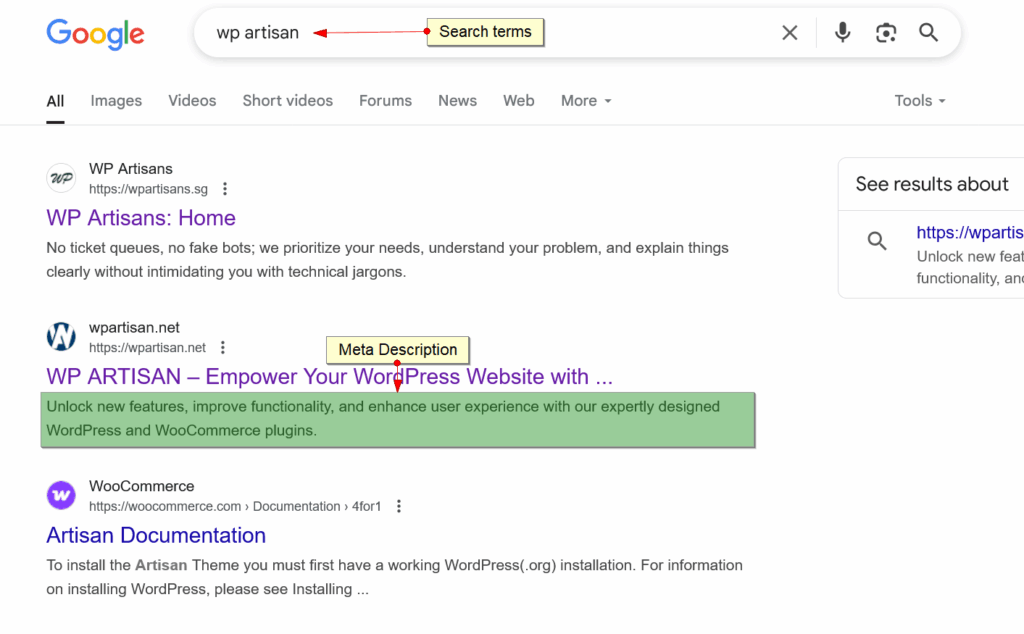
Here is an example of the meta description tag on search results:
How to add meta tags to a WordPress website without plugins?
In the theme functions.php file, first, you need to add meta fields for posts, pages or custom post types to add meta keywords and meta descriptions.
Here is the code to add meta fields and save meta values:
function func_add_custom_box() {

	$post_types = array('post', 'page', 'quick-tips', 'programming_with_php');

	foreach ( $post_types as $post_type ) {
		add_meta_box(
			'wa_seo_metas',
			'SEO Meta BOXES',
			'wa_seo_meta_box_html',
			$post_type
		);
	}
}
add_action( 'add_meta_boxes', 'func_add_custom_box' );

function wa_seo_meta_box_html( $post ) {

	echo '<p class="meta-options">
		<label for="wa_meta_keywords_field">Meta Keywords</label>
		<input id="wa_meta_keywords" class="widefat form-row-wide" type="text" name="wa_meta_keywords" value="'.esc_attr( get_post_meta( get_the_ID(), 'wa_meta_keywords', true ) ).'">
	</p>
	<p class="meta-options">
		<label for="wa_meta_description_field">Meta Description</label>
		<textarea id="wa_meta_description" class="widefat form-row-wide" name="wa_meta_description">'.esc_html( get_post_meta( get_the_ID(), 'wa_meta_description', true ) ).'</textarea>
	</p>';
}
function wa_insert_submission( $post_id ) {
$wa_meta_keywords = sanitize_text_field( $_POST['wa_meta_keywords'] );
$wa_meta_description = sanitize_textarea_field( $_POST['wa_meta_description'] );
if ( !empty( $wa_meta_keywords ) ) {
update_post_meta( $post_id, 'wa_meta_keywords', $wa_meta_keywords );
}
if ( !empty( $wa_meta_description ) ) {
update_post_meta( $post_id, 'wa_meta_description', $wa_meta_description );
}
}
add_action( 'save_post', 'wa_insert_submission' );Here is the output of the above code :
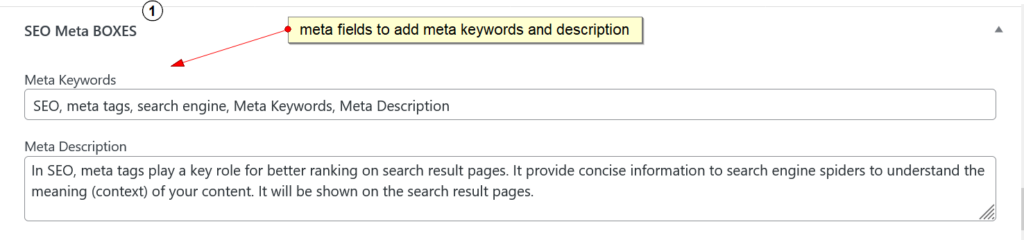
We need to add that meta information in the frontend using ‘wp_head’ action hook. Please check the code below :
function wpartisan_add_seo_metas() {
    global $post;
    if ( is_singular() ) {

		$wa_meta_keywords = trim(get_post_meta($post->ID,'wa_meta_keywords',true));
		$wa_meta_description = trim(get_post_meta($post->ID,'wa_meta_description',true));

		if( !empty( $wa_meta_description ) ){
			$des_post = $wa_meta_description;
		}else{
			$get_short_des = $post->post_excerpt;
			if( empty( $get_short_des ) ){
				$get_short_des = $post->post_content;
			}
			$des_post = strip_tags( $get_short_des );
			$des_post = strip_shortcodes( $des_post );
			$des_post = str_replace('"', '', $des_post);
			$des_post = str_replace( array("\n", "\r", "\t"), ' ', $des_post );
			$des_post = mb_substr( $des_post, 0, 145, 'utf8' );
		}

        echo '<meta name="description" content="' . $des_post . '" />' . "\n";

		if( !empty( $wa_meta_keywords ) ) {
			echo '<meta name="keywords" content="' . $wa_meta_keywords . '" />' . "\n";
		}else{
			if($post->post_type == 'post') {

				$cats = get_the_category( $post->ID );
				$tags = get_the_tags( $post->ID );

				if( !empty( $cats ) && !empty( $tags ) ){
					$keywords = array_merge($cats,$tags);
				}else{
					if( !empty( $cats ) )
						$keywords = $cats;
					if( !empty( $tags ) )
						$keywords = $tags;
				}

			}elseif($post->post_type == 'quick-tips'){
				$keywords = get_the_terms( $post->ID, 'topics' );
			}

			$metakeywords = '';
			if( !empty( $keywords ) ){
				$metakeywords = join(', ', wp_list_pluck($keywords, 'name'));
				echo '<meta name="keywords" content="' . $metakeywords . '" />' . "\n";
			}
		}

    }
    if ( is_home() ) {
        echo '<meta name="description" content="This website teach you how to use WordPress Actions And Filters Hook, Develop Plugins and Themes And how to do programming with PHP. Also we offer a simple and top notch solution for your complexity in PHP, WordPress and WooCommerce." />' . "\n";
        echo '<meta name="keywords" content="WordPress, WordPress Blog, WordPress Article, WooCommerce, Actions And Filters Hook, Plugins, Themes, Programming with PHP, Blog" />' . "\n";
    }
    if ( is_category() ) {
        $des_cat = strip_tags(category_description());
		$des_cat = mb_substr( $des_cat, 0, 145, \'utf8\' );
        echo '<meta name="description" content="' . $des_cat . '" />' . "\n";
    }
}
add_action( 'wp_head', 'wpartisan_add_seo_metas');
In the above code, you can see I added some conditions to add meta description dynamically and meta keywords from post or page content, categories and tags when meta keywords and description field are empty.
Plugins to Enhance Your WooCommerce Store
Carefully selected tools to help you customize, manage, and optimize your WooCommerce experience.
Woo Parent Category Selector
- Automatically assign parent categories when child categories are selected
- Prevent accidental removal of required parent categories
- Automatically repairs missing parent category assignments during product save
- Bulk repair existing WooCommerce product category structures
- Keeps product category structures organized and consistent

Product Catalog Mode For WooCommerce
- Turn your WooCommerce store into catalog mode instantly
- Hide Add to Cart buttons and product prices conditionally
- Apply rules by user role, country, or scheduled time periods
- Display custom messages and inquiry options for products
- Control visibility settings globally or per product

Remove Add to Cart Button for WooCommerce
- Remove Add to Cart buttons from shop and product pages
- Hide buttons conditionally for selected products or categories
- Replace Add to Cart with custom text or messages
- Control button visibility by user role and product type
- Lightweight settings interface with easy customization

Remove Product Content for WooCommerce
- Hide product title, image, price, rating, and descriptions
- Remove tabs, meta information, SKU, tags, and related products
- Control visibility separately for shop and single product pages
- Customize WooCommerce layouts without coding
- Enable or disable content elements with simple settings

Really Simple XML and HTML Sitemap
- Generate both XML and HTML sitemaps automatically
- Display sitemaps anywhere using ShortCode support
- Include pages, posts, and custom post types
- Exclude selected pages or posts easily
- Supports WPML and Polylang multilingual plugins