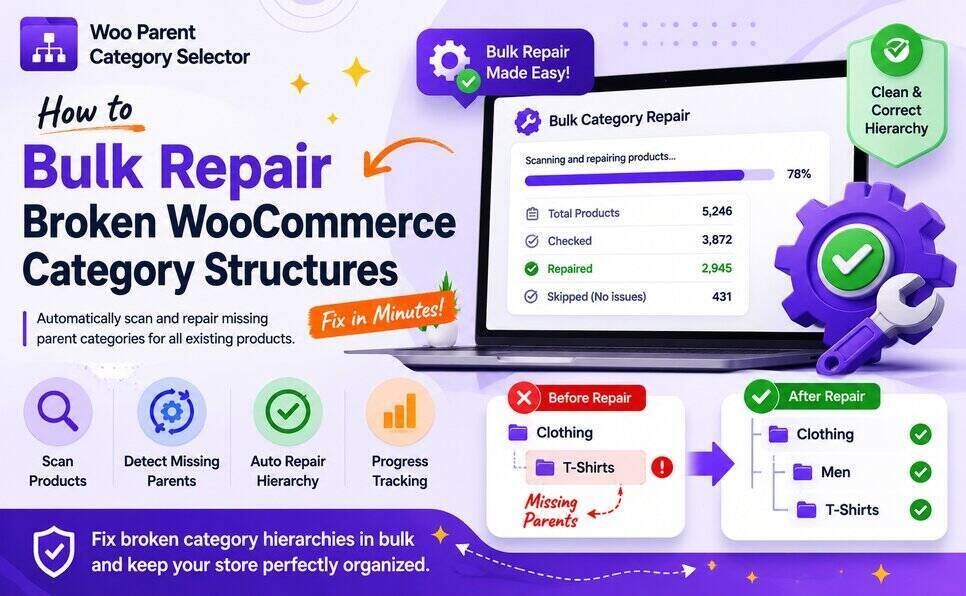
Many WooCommerce stores already contain products with inconsistent category hierarchy structures.
This commonly happens when:
- importing products via CSV,
- migrating stores,
- syncing products from ERP systems,
- or managing large product catalogs manually.
Over time, products may become assigned to child categories without assigning their required parent categories.
For example:
- Clothing
- Men
- T-Shirts
- Men
A product may only be assigned to:
- T-Shirts
while missing:
- Men
- Clothing
This creates incomplete category hierarchy relationships throughout the WooCommerce store.
Why Broken Category Structures Matter
Broken category relationships can affect:
- Product filtering
- Store navigation
- Breadcrumb consistency
- Category archives
- WooCommerce filtering plugins
- Product discovery
- Taxonomy organization
- SEO structure
For stores with hundreds or thousands of products, manually fixing these issues becomes extremely difficult.
Why Bulk Category Repair Is Important
The Bulk Category Structure Repair feature in Woo Parent Category Selector helps WooCommerce store owners automatically repair missing parent category assignments across existing products.
Instead of manually checking every product, the plugin can scan WooCommerce products and automatically repair incomplete category hierarchies in bulk.
This is especially useful for:
- large WooCommerce stores,
- imported product catalogs,
- multi-admin stores,
- ERP-connected stores,
- migration projects,
- and stores with inconsistent taxonomy structures.
How Woo Parent Category Selector Helps
The plugin processes products in batches and automatically:
- detects missing parent categories,
- repairs category relationships,
- maintains proper hierarchy structure,
- and helps keep WooCommerce taxonomy relationships clean and consistent.
The repair system also includes:
- progress tracking,
- confirmation dialogs,
- optimized WooCommerce product queries,
- and scalable batch processing.
This helps ensure safe and efficient repairs even on larger WooCommerce stores.
Built for Large WooCommerce Stores
Woo Parent Category Selector follows:
- WordPress coding standards,
- WooCommerce development standards,
- and WooCommerce HPOS compatibility.
The repair process is optimized to help avoid timeout issues during bulk operations.
Prevent Future Category Mistakes Automatically
Bulk repair helps fix existing category structure issues.
However, preventing future mistakes is equally important.
Woo Parent Category Selector also includes Automatic Parent Category Repair during product save.
This helps ensure products always maintain proper category hierarchy relationships moving forward.
👉 Read also:
Why Automatic Parent Category Repair Matters in WooCommerce
Additional Plugin Features
Woo Parent Category Selector also includes:
- Automatic parent category selection
- Prevent parent deselection while child categories remain selected
- Hide “Uncategorized” category
- Restrict products to only one category
- Support for hierarchical WooCommerce taxonomies
Plugins to Enhance Your WooCommerce Store
Carefully selected tools to help you customize, manage, and optimize your WooCommerce experience.
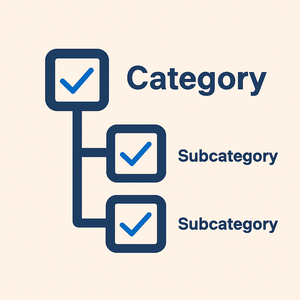
Woo Parent Category Selector
- Automatically assign parent categories when child categories are selected
- Prevent accidental removal of required parent categories
- Automatically repairs missing parent category assignments during product save
- Bulk repair existing WooCommerce product category structures
- Keeps product category structures organized and consistent
Product Catalog Mode For WooCommerce
- Turn your WooCommerce store into catalog mode instantly
- Hide Add to Cart buttons and product prices conditionally
- Apply rules by user role, country, or scheduled time periods
- Display custom messages and inquiry options for products
- Control visibility settings globally or per product

Remove Add to Cart Button for WooCommerce
- Remove Add to Cart buttons from shop and product pages
- Hide buttons conditionally for selected products or categories
- Replace Add to Cart with custom text or messages
- Control button visibility by user role and product type
- Lightweight settings interface with easy customization

Remove Product Content for WooCommerce
- Hide product title, image, price, rating, and descriptions
- Remove tabs, meta information, SKU, tags, and related products
- Control visibility separately for shop and single product pages
- Customize WooCommerce layouts without coding
- Enable or disable content elements with simple settings

Really Simple XML and HTML Sitemap
- Generate both XML and HTML sitemaps automatically
- Display sitemaps anywhere using ShortCode support
- Include pages, posts, and custom post types
- Exclude selected pages or posts easily
- Supports WPML and Polylang multilingual plugins